HOW TO GENERATE A TRANSACTIONS REPORT
In this tutorial, you will learn how to generate a Transactions Report within TYC.
Click the "Reports" section at the top of the page:

Then, click "Transactions Report" in the Select Report drop-down menu:

Fill in your desired criteria and click "Run Report":

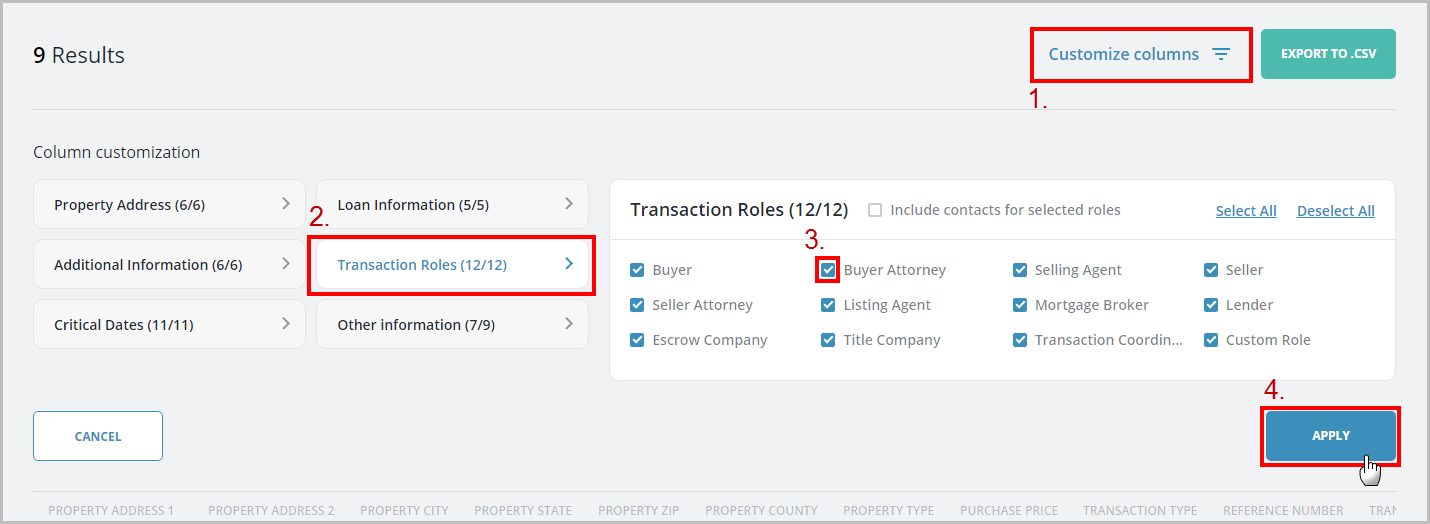
Click "Customize Columns" if you would like to choose which data points are included in your results. After you make your check-box selections in each section, click Apply:
The data points you selected will appear instantly in the viewer. Use the horizontal scrollbar if needed. You may Export your results to .CSV by clicking the appropriate button:

You can click "Reset" to run another report.
0 Comments